I ran into an issue where Burp Suite’s embedded Chromium browser wouldn’t launch on Linux.
These are the steps that fixed it.
This is a quick, common fix that adds a new setuid root binary to your system, which has security implications. It’s good to be aware of that.
The less Secure & Common Fix#
1. Find the chrome-sandbox binary#
I used the installer.sh to install burp suite, so my path was something like this
~/BurpSuiteCommunity/burpbrowser/*/chrome-sandboxIf you’re not sure where it is, you can locate it with find:
find ~ -type f -name "chrome-sandbox"You’ll likely see multiple versions. For example:
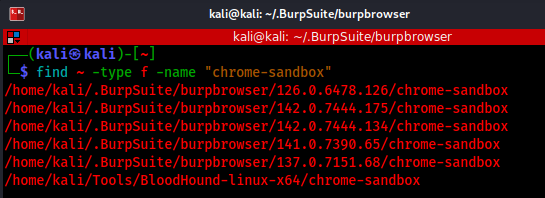
In my case, the latest version was
/home/kali/.BurpSuite/burpbrowser/142.0.7444.175/chrome-sandboxYou can go to the directory and list all the versions there directly:
cd /home/kali/.BurpSuite/burpbrowser && ls
Then remove the ones you don’t want:
rm -rf 126.0.6478.126 137.0.7151.68 141.0.7390.65 142.0.7444.134Adjust to match the versions you actually have
2. Fix owner and permissions#
sudo chown root:root /path/to/chrome-sandbox
sudo chmod 4755 /path/to/chrome-sandbox
This sets chrome-sandbox as setuid root, which Chromium’s sandbox requires on some Linux setups. Only do this if you are comfortable adding another setuid binary to your system.
You can verify it worked with
ls -l /path/to/chrome-sandbox3. Launch the Burp browser#
Close Burp Suite completely and reopen it, then try launching the embedde browser again.
In my case, it worked immediately without restarting Burp. If it doesn’t for you, try fully closing Burp Suite and open it again before retrying.
The less common & Secure Fix#
If you’d prefer a more security-conscious approach, Anthony Hanel wrote a great post on confinement instead of adding another setuid binary.
I have not personally used it to fix the issue I had, but, it’s worth a read.
His method doesn’t rely on setting up a new setuid chrome-sandbox binary, which is a better long-term option if you care about security.