What Happened?#
I bought a framework 13 earlier this year, and I was having some issues with the screen randomly freezing after booting in the GUI (startx). I noticed that the screen would not freeze when I boot and stay in the console. I also tried different distro (Ubuntu, Fedora and Kali) and it was the same issue. Luckily, I use Pentoo, and because I configured it to boot in the console first instead of the GUI directly, I was able to spot the difference. My friend & mentor is the lead dev for Pentoo, which means he could help me troubleshoot the issue better.
Screen Freezing?#
I wish I still had the video I recorded of the screen randomly freezing so I could show what it looks like, but I will do my best to explain it. By screen freezing, I mean that the mouse will still be visible on the screen, you could move it, but you can’t click anywhere, essentially a GPU hang where the input stack is alive, but the display buffer has stopped updating.
Troubleshooting#
I went to Bsides Charm to hang out with the RF Village and take part in some of the CTF Challenges. So, I brought my framework with me and everyone was taking a look to find out what could be causing the issue. We went by process of elimination as we tested different things.
My mentor, who is “the” dev for pentoo, took a look and noticed that I was using an older version of mesa, which is a graphic library. He commented that the issue I was experiencing was fixed in the newer, more recent update. He also looked at the make.conf, which is the config file that tells the portage how the OS should be built and optimized. In the make.conf file, he noticed that all the GPU drivers in existence were being used. So, he removed everything else but the drivers for the GPU I was using.
That seemed to have fixed the issue, and then something else happened with the bootloader. The screen would get stuck at boot. At least, now I knew the issue wasn’t at the hardware level, which for some reasons, I thought otherwise.
I finally had a lead, thanks to my mentor. So, it was time to fix it for good.
The FIX#
After looking at kernel logs, googling, reading the archlinux documentation and lurking on Reddit, here is what seems to have fixed the issue for me.
Graphic Library Update and Environment Cleanup#
- Edit make.conf and remove everything but your GPU drivers. In my case,
VIDEO_CARDS="amdgpu radeonsi"
sudo nano /etc/portage/make.conf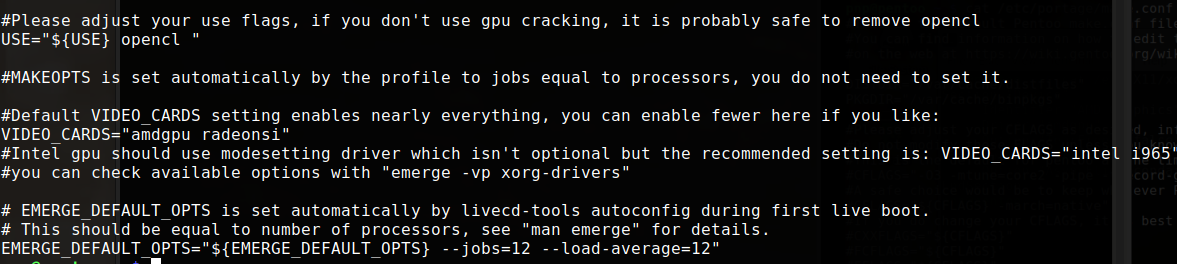
- Update Mesa
emerge --ask --update --changed-use --deep --verbose media-libs/mesaKernel Stability#
- Editing the grub config file
sudo nano /etc/default/grub- Add the parameters
amdgpu.dcdebugmask=0x10 amdgpu.sg_display=0to GRUB_CMDLINE_LINUX_DEFAULT like this
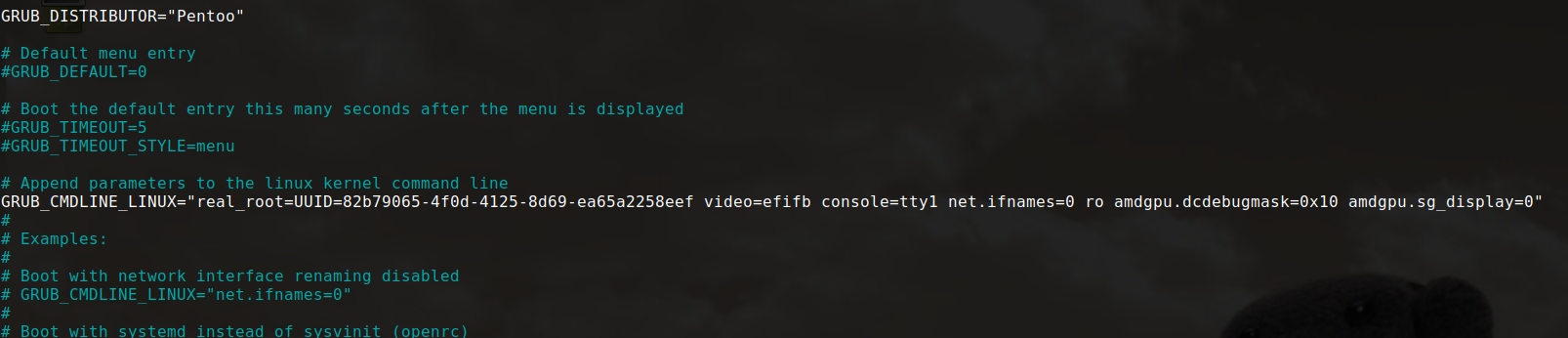
- Save and Update grub
sudo grub-mkconfig -o /boot/grub/grub.cfgThe exact command to update grub varies depending on the OS you are using. Since I’m using pentoo, this command also works on gentoo/arch (maybe fedora too). But for debian/ubuntu, it might be different.
Display Server Configuration#
- Create the Display server configuration file
sudo nano /etc/X11/xorg.conf.d/20-amdgpu.conf- Add the following:
Section "Device"
    Identifier "AMD Graphics"
    Driver "amdgpu"
    Option "TearFree" "false"
    Option "VariableRefresh" "false"
    Option "AsyncFlipSecondaries" "true"
EndSection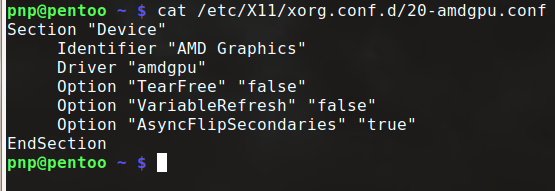
I’m using an AMD GPU, but if you are using Nvidia, your config file will be slightly different.
- Save and then reboot.
I noticed that the mouse was disappearing sometimes when I was in a browser. setting TearFree to “true” in the 20-amdgpu.conf file fized the issue
What helped#
Here are the links that actually helped me figure it out, in case my fix doesn’t work for you. You should try to go through them and hopefully find the fix that works for your specific situation.